

coreplus

Print Future Appointments

By coreplus | Feb 20, 2015

Do you need to print future appointments for a client?

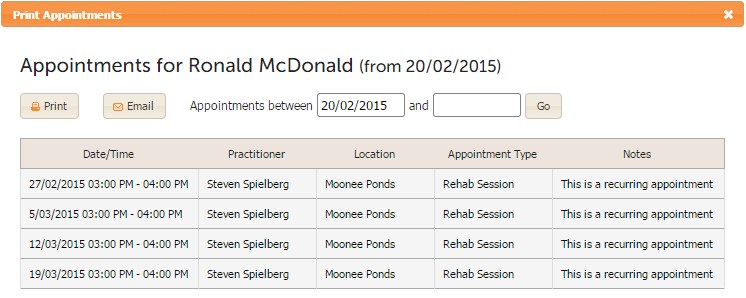
coreplus makes this easy, simply open the clients appointment tab from the client overview and select the “Print Upcoming” button at the top of the screen and the following pop up will appear:
Print Future Appointments

Select the applicable date range and print.

Recent Stories


Featured

Extend the impact of your therapy sessions with the help of Theratrak, our newest Add On partner

Did you know that research suggests that the minute a patient walks out the door,… Read More

By Enzemam Moeen | Aug 17, 2022

TeleHealth

How to Improve Success of Telehealth for Clients and Clinics

Clinics and clients both stand to benefit from telehealth services, but only when done correctly…. Read More

By Diana Younan | May 30, 2022

New Feature

NEW: SimpleSet exercise software now integrates with coreplus!

As a physical therapist, it can be challenging to empower your clients to reach and… Read More

By Diana Younan | Jan 21, 2022

Subscribe to a weekly dose of coreplus news